" height="21.943622918266314px" id="HqU1V_VXu" width="76.57577685890533px"/><path d="M 20.228 10.24 L 10.114 10.24 L 10.114 8.777 L 20.228 8.777 Z M 21.672 20.48 L 15.171 20.48 L 15.171 19.018 L 21.672 19.018 Z M 0 19.018 L 0 0 L 1.445 0 L 1.445 19.018 Z M 20.228 19.018 L 20.228 0 L 21.672 0 L 21.672 19.018 Z" fill="rgb(255, 255, 255)" height="20.480488152641314px" id="bfuCuMlPp" transform="translate(27.507 1.519)" width="21.672358558014366px"/><path d="M 42.622 19.018 L 42.622 0 L 44.067 0 L 44.067 19.018 Z M 54.903 8.777 L 54.903 0 L 56.348 0 L 56.348 8.777 Z M 75.131 8.777 L 75.131 0 L 76.575 0 L 76.575 8.777 Z M 70.796 19.018 L 70.796 10.241 L 72.241 10.241 L 72.241 19.018 Z M 59.238 19.018 L 59.238 10.241 L 60.683 10.241 L 60.683 19.018 Z M 1.445 0 L 1.445 20.481 L 0 20.481 L 0 0 Z M 11.559 20.481 L 1.445 20.481 L 1.445 19.018 L 11.559 19.018 Z M 21.672 10.24 L 10.114 10.24 L 10.114 8.777 L 21.672 8.777 Z" fill="rgb(255, 255, 255)" height="20.480826258659363px" id="TduQKyNcg" transform="translate(0 1.519)" width="76.57543472988937px"/><path d="M 10.114 9.07 L 10.114 0 L 11.559 0 L 11.559 9.07 Z M 0 19.311 L 0 10.533 L 1.445 10.533 L 1.445 19.311 Z M 10.114 20.774 L 10.114 13.459 L 11.559 13.459 L 11.559 20.774 Z M 4.334 20.774 L 4.334 13.458 L 5.779 13.458 L 5.779 20.774 Z M 5.78 13.459 L 10.114 13.459 L 10.114 14.922 L 5.78 14.922 Z M 5.78 19.311 L 10.114 19.311 L 10.114 20.774 L 5.78 20.774 Z M 79.032 2.487 L 92.035 2.487 L 92.035 3.95 L 79.032 3.95 Z M 96.37 2.487 L 109.373 2.487 L 109.373 3.95 L 96.37 3.95 Z M 113.708 2.487 L 126.711 2.487 L 126.711 3.95 L 113.708 3.95 Z M 135.38 2.487 L 148.384 2.487 L 148.384 3.95 L 135.38 3.95 Z M 86.256 8.339 L 92.035 8.339 L 92.035 9.802 L 86.256 9.802 Z M 97.815 8.339 L 110.818 8.339 L 110.818 9.802 L 97.815 9.802 Z M 80.477 15.653 L 93.48 15.653 L 93.48 17.116 L 80.477 17.116 Z M 97.815 15.653 L 110.818 15.653 L 110.818 17.116 L 97.815 17.116 Z M 79.032 15.653 L 79.032 3.95 L 80.477 3.95 L 80.477 15.653 Z M 96.37 15.653 L 96.37 3.95 L 97.815 3.95 L 97.815 15.653 Z M 113.708 17.116 L 113.708 3.95 L 115.153 3.95 L 115.153 17.116 Z M 135.38 15.653 L 135.38 3.95 L 136.825 3.95 L 136.825 15.653 Z M 152.718 15.653 L 152.718 2.487 L 154.163 2.487 L 154.163 15.653 Z M 170.056 15.653 L 170.056 2.487 L 171.5 2.487 L 171.5 15.653 Z M 187.394 15.653 L 187.394 2.487 L 188.839 2.487 L 188.839 15.653 Z" fill="rgb(255, 255, 255)" height="20.773521135658505px" id="jAG3tW2Le" transform="translate(10.169 1.182)" width="188.83858780606124px"/><path d="M 62.127 5.852 L 75.131 5.852 L 75.131 7.315 L 62.127 7.315 Z M 79.465 5.852 L 92.469 5.852 L 92.469 7.315 L 79.465 7.315 Z M 96.803 5.852 L 108.362 5.852 L 108.362 7.315 L 96.803 7.315 Z M 79.465 0 L 91.024 0 L 91.024 1.463 L 79.465 1.463 Z M 92.469 1.463 L 92.469 5.852 L 91.024 5.852 L 91.024 1.463 Z M 109.807 7.315 L 109.807 14.629 L 108.362 14.629 L 108.362 7.315 Z M 62.127 13.166 L 75.131 13.166 L 75.131 14.629 L 62.127 14.629 Z M 79.465 13.166 L 92.469 13.166 L 92.469 14.629 L 79.465 14.629 Z M 34.675 14.629 L 34.675 1.463 L 36.12 1.463 L 36.12 14.629 Z M 56.348 13.166 L 56.348 1.463 L 57.793 1.463 L 57.793 13.166 Z M 44.789 13.166 L 57.793 13.166 L 57.793 14.629 L 44.789 14.629 Z M 39.01 14.629 L 39.01 2.926 L 40.455 2.926 L 40.455 14.629 Z M 39.01 1.463 L 39.01 0 L 40.455 0 L 40.455 1.463 Z M 0 13.166 L 0 5.852 L 1.445 5.852 L 1.445 13.166 Z M 17.338 5.852 L 17.338 1.463 L 18.782 1.463 L 18.782 5.852 Z M 106.917 0 L 108.361 0 L 108.361 1.463 L 106.917 1.463 Z M 105.472 1.463 L 106.917 1.463 L 106.917 2.926 L 105.472 2.926 Z M 104.027 2.926 L 105.472 2.926 L 105.472 4.389 L 104.027 4.389 Z M 102.583 4.389 L 104.027 4.389 L 104.027 5.852 L 102.583 5.852 Z" fill="rgb(255, 255, 255)" height="14.62930651858536px" id="yTdOA_r0t" transform="translate(102.194 3.714)" width="109.80650620205734px"/></g></svg>)
A practical guide for founders and e-commerce brands on how to obtain a UPC barcode, when GS1 is the safer route, and what to prepare before using barcodes on packaging, Amazon, or retail listings.

To obtain a UPC barcode, the most reliable route is registering directly with GS1, the global standards body that issues unique company prefixes. Once registered, you assign a product number to each SKU, combine it with your prefix to form a GTIN (Global Trade Item Number), and generate a scannable barcode image from that number. GS1 membership costs vary by company size and number of products, starting around $250 per year in the US. Third-party reseller codes are cheaper, but they carry real risks on platforms like Amazon and in retail supply chains. For founders launching physical products, getting this right before packaging goes to print is far less painful than fixing it after.
Starting a physical product business means running into acronyms fast. SKU, GTIN, UPC, EAN — they all sound like they belong in the same category, but they serve very different functions. Before your first production run ships, before your packaging files go to the printer, and definitely before you list anything on Amazon, you need a clear answer to one practical question: how do you actually get a UPC barcode for your product? This guide walks through the full process, from definitions to checklist, so you can move forward without second-guessing the basics.
UPC, GTIN, and SKU: Getting the Definitions Right
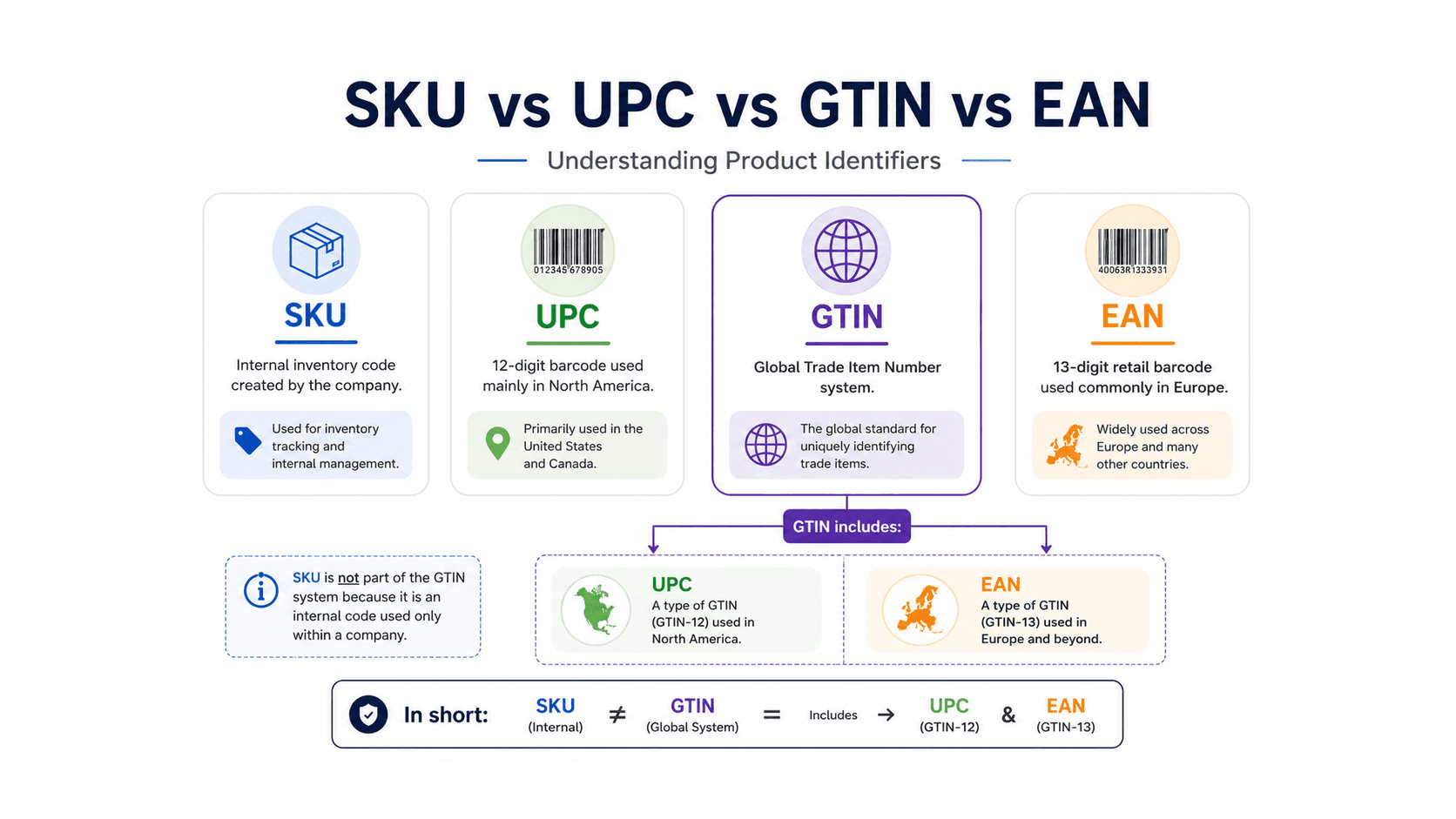
A UPC barcode is not the same as a SKU. Mixing these up causes real headaches, particularly when you start syncing inventory data across sales channels.
A SKU (Stock Keeping Unit) is an internal code you create yourself. It can be anything — "BLK-HEADSET-XL", "ITEM-004", whatever system makes sense for your warehouse. SKUs are for your team. They mean nothing to a retailer, a distributor, or a marketplace algorithm.
A UPC (Universal Product Code) is a 12-digit number tied to a globally standardised barcode format. Part of a broader system called a GTIN, or Global Trade Item Number. GTINs come in different lengths — GTIN-12, GTIN-13, GTIN-14 — depending on the market and product type. A UPC barcode for a product sold in North America is almost always GTIN-12, while European retailers typically use EAN-13, which is a GTIN-13. The barcode printed on retail packaging encodes that number in a format scanners can read.
Why the Distinction Matters in Practice
Here is the part that surprises a lot of first-time founders: your UPC is not handed to you by Amazon, Walmart, or any retailer. It comes from you, grounded in a company prefix you license from GS1. Retailers scan your barcode and pull product data from a shared database — so if your barcode number is duplicated, unlicensed, or recycled from a reseller, that lookup can fail, match the wrong product, or get your listing flagged without any clear explanation of why.
Think of it like a domain name. You do not own "yourproduct.com" until you register it. Your UPC number works the same way — it is not truly yours until it is properly issued under a legitimate prefix. Which brings us to the registration process itself.
How to Obtain a UPC Barcode Through GS1
The clearest and most defensible path is going through GS1 barcodes directly. GS1 is the non-profit organisation that maintains barcode standards globally, and when you register with GS1 US (or GS1 UK, GS1 Australia, depending on your market), you receive a company prefix — a unique sequence of digits that forms the root of every product identifier you will ever issue.
Registration itself is fairly painless. You visit the GS1 website for your region, fill in your company details, pick a prefix length based on how many products you need, and pay the licensing fee. In the US, fees start around $250 for a single GTIN and scale up — something like $1,500 per year for a prefix supporting up to 1,000 product codes (which is actually a lot of headroom for most early-stage brands). Annual renewal fees apply on top of that.
Assigning GTINs to Your Products
Once you have your prefix, product numbers are built by appending a unique item reference and then calculating a check digit. GS1 provides tools to handle this automatically, so you end up with a valid GTIN for each variant you're selling.
Every variant that has a different physical form needs its own barcode. Different colours — separate barcode. Different sizes — separate barcode. A bundle pack containing three units — separate barcode. This catches people off guard, especially around day 30 of a launch crunch when you discover your packaging file has one code and you actually have seven SKUs.
Generating the Barcode Image
Having a valid GTIN number is not the same as having a printable barcode. You need the actual image file in the right format — usually EPS or SVG for print use — at the correct dimensions and with adequate quiet zones (the blank space on either side that scanners depend on). GS1 provides a barcode generation tool, as do various commercial vendors once you have a legitimate GTIN in hand.
Check with your packaging designer early. They will need the correct file format and the exact GTIN number before finalising print-ready files. Getting this wrong and having to reprint costs real money, and it happens more often than you'd expect.
GS1 vs. Cheap Reseller Codes: A Real Risk Comparison
Reseller codes exist because GS1 fees genuinely sting for very small businesses. Sites selling "official barcodes" for $5 to $30 each are technically offering real GTINs — they bought a company prefix from GS1 years ago and are sub-licensing codes beneath it. The numbers scan. The problem is ownership and data integrity.
When a retailer or marketplace looks up a GTIN, they expect to find your company as the registered owner of that prefix. If the prefix resolves to some third-party reseller instead, that is a mismatch. Amazon has explicitly stated they require barcodes issued directly by GS1 (or covered by a brand exemption), and listings built on reseller codes have been suppressed without warning. Sellers often go eleven months into a scaled campaign before hitting a listing error they cannot diagnose — by which point the cost of sorting it out is significant.
For most serious product brands, the GS1 annual fee is simply a cost of doing business. If you are testing a single product and genuinely cannot justify the fee, Amazon's Brand Registry exemption program is worth exploring, though it is a workaround rather than a long-term foundation.

The Full Workflow: From Registration to Retail-Ready
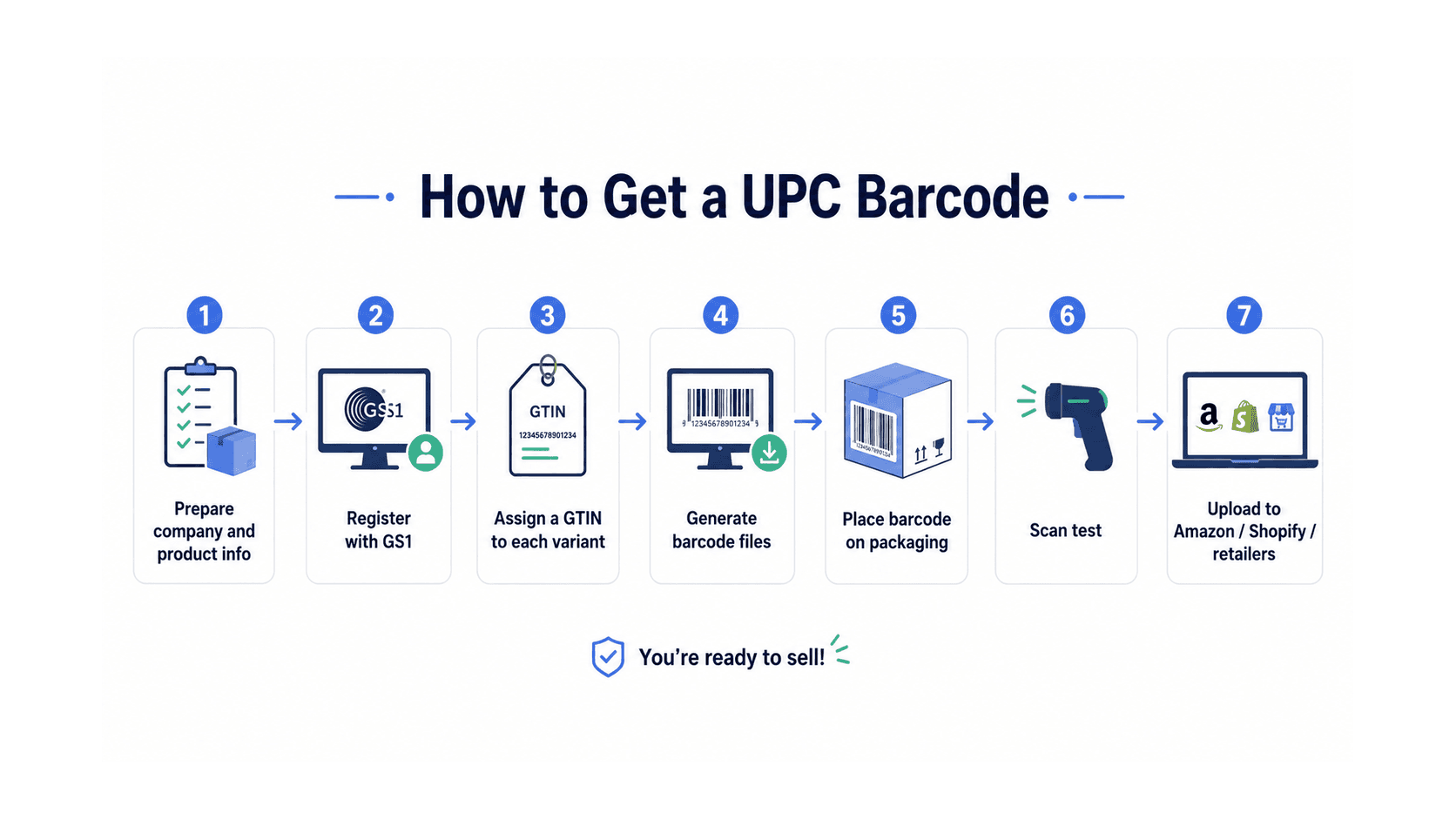
Let’s walk through the actual sequence so there are no gaps.
Start by preparing your company information: legal business name, address, and a clear inventory of every product and variant you plan to sell. You will need product names, descriptions, pack sizes, and bundled configurations. Doing this before you register saves time, because you will be entering product data into GS1’s product database (called the GS1 Registry) as part of setup anyway.
Register with GS1 for your country. Pay the fee. Record your company prefix securely — it underpins every future product you make.
Assign a unique item reference number to each product variant. Combine each reference with your prefix, run the check digit calculation through GS1’s tool, and confirm the full GTIN. Enter each product into the GS1 Registry with accurate descriptions. This data feeds retail databases and marketplace product catalogues directly.
Generate barcode image files for each GTIN in print-ready format. Pass them to your packaging designer with clear placement and sizing specifications. GS1 recommends minimum barcode dimensions and specific quiet zone widths — your designer should know these, but verify anyway.
Before finalising packaging, do a scan test. Print a test version at the actual intended size and run it through a barcode scanner (even a phone scanner app works for a basic check). Confirm the scan reads correctly and returns the right number.
Once packaging is approved, upload your GTINs to every sales channel. Amazon, Shopify, and most EDI systems used by large retailers accept GTIN fields directly. Consistent product data across channels is what keeps duplicate listings and suppression issues from appearing later.
If you are working through a broader product launch, a solid product launch strategy will situate the barcode registration step alongside tooling, packaging, compliance, and lead time planning — where it belongs, not treated as an afterthought.
Pre-Launch Barcode Checklist
Before your inventory ships, before your listings go live, run through these points.
Company prefix: registered with GS1 for your region, annual renewal date noted.
Product list: every variant documented with its own unique GTIN, including size, colour, and bundle configurations.
Barcode images: EPS or SVG files generated at correct dimensions, quiet zones included, tested via scan.
Packaging files: barcode placed correctly, in a high-contrast area, sized to GS1 minimum specifications, approved by your printer.
GS1 Registry: all product data entered accurately, accessible by trading partners and marketplaces.
Channel listings: GTINs entered into Amazon Seller Central, Shopify, or distributor EDI systems, matching the product data in the GS1 Registry.
Compliance context: UPC registration sits alongside other product compliance requirements. Reviewing consumer product safety standards before launch helps ensure your product data and labelling are consistent with broader market entry requirements.
If your launch involves hardware development, manufacturing coordination, or packaging production, production risk support can help you catch gaps before they become expensive problems at the worst possible time.
Getting your UPC barcodes right is genuinely not complicated once you understand the system. Register with GS1. Assign GTINs. Generate proper files. Get them onto your packaging before print. The steps themselves are simple enough — it is the order of operations that trips people up, usually around 9 PM the night before a packaging deadline.